Showing posts with label iPhone. Show all posts

Monday, 23 September 2013

iPhone 5S Hands On

So, today I visited an Apple store for the first time since the iPhone 5S and 5C were released. My wife was in for a repair on her iPhone which gave me ample opportunity to have a play with the newest iDevice on the block.


Picking up a display model I have to say, it's very impressive. What struck me immediately was its thinness, managing to make my iPhone 4S look positively lardy in comparison. I know the dimensions and weight are almost identical to the iPhone 5, but it's still a marvellous thing to behold when you do get your hands on one .

The first thing I went for was the TouchID demo they have on the display units. This app basically allows you to map your fingerprint to the phone and test it without actually saving it. About 5 taps later and my thumb was successfully mapped and the device was registering my touch with 100% precision. This is very impressive technology for sure.

Next up is the camera, which is a similar 8mp effort as the 5, however with a greatly improved sensor. Now, while I couldn't check any photos on a large screen, the quality of what I was dealing with on the phone itself was superb. Great colour balance and fantastic clarity, everything you want in a decent camera. The slow motion video was well implemented and great fun, though I'm not sure if I'd ever use it properly, it's a fun enough toy.

With the boosted processor, iOS 7 whipped along at a fantastic pace. I've noticed that it can hang a little on my iPhone 4S. With the 5S being designed for the new OS, the performance is excellent. Very quickly opening apps and transitioning between screens.

The new champagne gold colour is quite nice in the flesh, however I still think it's a little gaudy. However, the silver and slate colours are beautiful and understated. I think I would personally go for the silver colour myself, that one to me is clean and elegant.

Initial impressions for the iPhone 5S for me are really good. The TouchID feature is particularly impressive in my eyes. I'll be getting a 5S in the coming months when my upgrade is due so look for a full review coming soon. However, on first impressions this is a stellar handset and worth every bit of the hype

Blackberry Cuts 40% Of Workforce, Braces For Takeover

Over the last weekend, Canadian smartphone maker Blackberry (formerly Research In Motion) announced that it was cutting 40% of its workforce and suspending consumer phone sales due to severe financial difficulties.


The company is expected to have lost $995million in it's 2nd quarter financial results. With the announcement of 4500 jobs being cut, the share price dropped by 17% to a record low for the firm.

Blackberry's chief executive Thorsten Heins released a statement on Friday saying: "We are implementing the difficult, but necessary operational changes announced today to address our position in a maturing and more competitive industry, and to drive the company toward profitability.


"Going forward, we plan to refocus our offering on our end-to-end solution of hardware, software and services for enterprises and the productive, professional end user."

Blackberry have been struggling every since competition from the iPhone and Android eroded their enterprise market. Previously, Blackberry's BES service was considered the defacto enterprise email service. However, as soon as iOS and Android began to incorporate secure Exchange email services, Blackberry's market share began to dip.

Blackberry tried to reinvigorate its fortunes with Blackberry 10, a new, eye catching and easy to use operating system bundled with the Z10 and Q10 handsets. However, spiralling costs and massive delays cost the company massively, with less than 6 million of the units sold since their release in January 2013. Considering after 3 days on sale, Apple had sold 9 million iPhone 5S units, it's an unmitigated failure for a device that had the future of a whole company on its shoulders.

The company is primed for takeover with Fairfax Financial, a corporate holdings company, pitching $4.7billion for the beleaguered firm. This values each share at around $9 each, wiping billions off the value of the company at it's peak.

Blackberry also announced that they were pulling their planned Blackberry Messenger app for iOS and Android devices. Once the "must have" part of teenage life, Blackberry Messenger has seen massive declines in user figures as users migrate to free alternatives such as WhatsApp or Snapchat.

Thursday, 19 September 2013

iOS7 Review

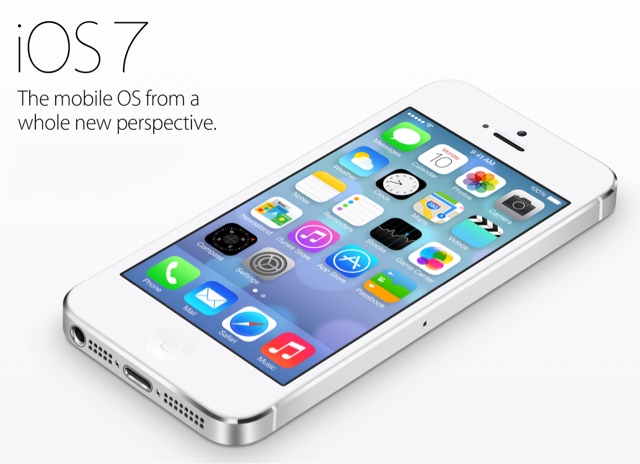
So, after months of waiting, Apple finally released iOS7 to the public on Wednesday. This is the first chance I've had to play with it, so I'm understandably excited.

Now, I'm not going to detail all the changes, that would take far too long and to be honest, there's already been plenty written about the new features, so I'm going to pick out a couple of things I use and detail those.

1: The UI


As you can see, it's a complete redesign. The Forstall design era is well and truly over. The new UI is flatter, features a lot of visually pleasing tricks and gimmicks.

For a start, the apps sit forward from the background, so if you tilt the phone on the home screen the background moves slightly. It's not a big difference, but it's a nice effect nonetheless.

Fonts have been refined, everything is cleaner and neater. It's rather nice.

2: The task menu


Swipe up from anywhere in the phone (including the lock screen) and you get this task menu. Simply enough it gives you quick short cuts to common functions such as Bluetooth, wifi, airplane mode, air play and the current music playing.

It's a nice feature, something iOS has been lacking since it's inception.

3: Multitasking


So whereas in iOS6, multi tasking consisted of the screen sliding up and a row of your open icons, in 7, you double tap the home button and you are greeted by this rather splendid card view.

While it does look similar to the Palm Pre's Palm OS, it makes multitasking look much snazzier, even if it doesn't add any functionality.

4: Notification Centre


The notification centre has had an overhaul. The transparency that sits throughout iOS7 is present here. Swipe down from any screen, again, including the lock screen, and you get a quick overview of your day. The weather, calendar events and your stocks.

The previous notification centre was overly cluttered and too busy for me, so this is a welcome change.

5: Camera


The camera app now caters directly for the Instagram lovers out there, with live filters and square frame photos all available from the camera's menus, it's a fairly pointless change in my eyes. But, plenty of people will enjoy it, so I can see the reasoning behind it.

The Verdict

I've only been able to play with iOS7 for a few hours, but overall it's a welcome change. iOS was getting stale and restrictive.

Although this UI change is very reminiscent of Android 4.3, it puts Apple back into the game when it comes to a modern UI.

One thing I will say is that on the iPad 2 it runs pretty slowly. So I'm assuming that on the iPhone 4 it will be the same. I'm running iOS7 on my iPhone 4S and whips along at a decent rate, so I would say the best way to experience iOS7 is to use iPhone 4S/iPad 3 or upwards.

Still, I like this UI a lot and I'll be interested to see the extra functionality on the 5S, such as the TouchID and Air Drop functions.

iOS7 is free to download now through iTunes or over the air when your device is connected to a wifi hotspot


Tuesday, 10 September 2013

Apple Announce The iPhone 5C and 5S

Straight from the live text, Apple have announced the next generations in the iPhone range.

First up, the 5C. The 5C entirely replaces the iPhone 5. It features exactly the same internal components save for an improved battery. The main difference is the new hardened polycarbonate shell, which comes in a range of colours.


The 5C is taking over the traditional "Previous model" price point. In the past, when Apple has released a new phone, they have knocked the previous model down to an 8gb storage amount and cut the price by about $100. This changes things. For the first time, it's still available in 16 or 32gb and there has been a significant design change. As well as this, a range of silicone rubber cases has been designed to complement the iPhone 5C, in a range of rather bright, teen friendly colours. Here is the green phone combined with the blue case... yeah...


Other than the case though, the phone is identical to the iPhone 5.

The new flagship phone for Apple is the iPhone 5S. This is an evolution on the 5 adding a raft of new features to the device, not least, another new colour palette:


That's right, that's a champagne gold colour you can see in between the traditional slate and silver colours. 


But away from the colour of the unit, there have been some serious revisions under the hood. The new A7 chip is 64 bit, contains 40x the processing power that the original iPhone had and is complemented by a second chip, the M7 co-processor which is dedicated to processing data from the motion sensors. This means that more of the phone's raw processing power can go towards apps and games, without having to worry about tracking the gyroscope and accelerometer in the phone.

The camera has also gotten a bump, featuring a 15% larger sensor and an f/2.2 size aperture to provide the best quality photos possible. The camera is capable of burst mode, 120fps slo-mo and features two LEDs for the flash, which the phone automatically adjusts to give you the perfect low light exposure.

The biggest new feature however, is TouchID. Yes, it's a fingerprint sensor. This excites me far too much.


Essentially, the home button now allows you to unlock your phone. The home button now contains a fingerprint sensor, protected by laser cut sapphire, which lets you simply touch your finger to the button and unlock the screen. This can also be used to authenticate iTunes/AppStore/iBooks purchases and save you constantly entering passwords. For the concerned among you, the fingerprints are encrypted and saved on the A7 chip, they are never shared with iCloud, nor are they allowed to be shared anywhere within the phone, which is a definite relief.

The iPhone 5S and 5C will both ship with iOS7 on the 20th of September. iOS 7 is available to download on the 18th of September. You can pre-order the 5C from Friday 13th of September, however there are no pre-orders available for the the 5S, you'll simply have to go and queue if you want one.

The UK prices are as follows (screen caps from the Apple UK store):


If you want the full, blow by blow details from the press conference, check out our live blog of the event here


Apple iPhone Event Live Coverage


This is a live text event from The Gadget Addicts. You do not need to refresh your page, the news will update automatically. You may need to click the "down" arrow on the right hand side of the text pane to start the news automatically. Please get in contact if you are having issues seeing the feed

Friday, 30 August 2013

Apple Introduce iPhone Trade In Scheme

Apple has introduced a trade in initiative in its US retail stores.

Simply enough, take in your old iPhone and an Apple Pip (my name for those who work in the stores) will check your phone out, then issue you with a voucher/gift card at a set value. This must then be used immediately towards the purchase of a new iPhone.


The amount you get for your old phone is based on the model, capacity and condition of the unit.

The timing of this couldn't be more significant as we're now only a week and a half away from the 10th of September, the much rumoured date that the iPhone 5S and supposed 5C are to be revealed.

Other rumours that are kicking about are that the new iPhone(s) are to be available for purchase on the 20th of September in the traditional first wave countries (US, UK, Europe etc), which follows the previous pattern of an iPhone being available 2 to 3 Fridays after its announcement.

The rumour is backed up by information that T-Mobile US and AT&T have stopped holidays for a period starting on the 20th of September. Networks only do this when there is a huge release coming and they need to have all hands on deck to make sure they have enough staff to cover the demand.

Having worked at T-Mobile UK across two iPhone launch dates (4 and 4S), it's pandemonium on the phones, so it's a very sensible stance to take. 

More information as I get it

Friday, 16 August 2013

New iPhone Announcement in September?

Rumours are flying around the Internet that the next iPhone (5S? 6?) is going to be revealed at an Apple press event on the 10th of September.


At present, it's just rumours as Apple hasn't issued invites to any event on that day. However, given their past behaviour on such things its a strong possibility.

Apple have frequently revealed iPhone and iPod releases on the second Tuesday in September. There was no iPhone announcement at WWDC in June so logically this would sense.

Also, Apple has just seeded the 6th developer beta of iOS 7, so based on previous experience this would give credence the to the possibility that the new OS is close to release, which typically happens the week of, or the week before a new iPhone is released.

So while it's not set in stone yet (and won't be until Apple release press accreditation), it's looking very likely.

So what can we expect from the next iPhone?


Well, we definitely know it'll be running the completely revamped iOS7, which to be honest, I'm very excited for. iOS hasn't really changed much in its overall look since the first iPhone. Sure there's been incremental updates, but the look and feel has remained largely the same since 2007. But this is an obvious inclusion.

The rumour mill around potential features has been going ballistic of late. People have surmised that the next iPhone could contain a fingerprint reader, controls on the rear of the device (unlikely), a gold version of it (I hope that doesn't happen), a cut price version with a plastic shell as well of a host of other outlandish suggestions.

Personally, I reckon we'll get the requisite camera improvements, better signal processing and improvements to the finish so it doesn't chip so easily. The big part of the new iPhone will be iOS7, so I can't imagine there'll be an amazing amount of hardware changes. Though I'll be very happy if I'm proved wrong.

It's only a few weeks till September 10th, so keep your eyes peeled. I'll keep you all updated, because I'm nice like that.

Sunday, 11 August 2013

Beware Fake Phone Chargers

It's become a big story recently that fake phone chargers can be dangerous. The major news outlets are reporting that people have bought chargers for their phones from cheap sources that are actually knock offs, which have then gone on to explode, catch fire or destroy their expensive phones.


As lovers of gadgets, surely that last thing any of us wants is for our shiny, expensive smartphone to get destroyed by a cheap chatty charger, right?

So why are these chargers suddenly under the spotlight?

In July, Apple started a charger amnesty in the US. Basically, if you had a fake iPhone charger you could return it to Apple for disposal and in turn, get an official charger for $10 instead of the normal $25. 

That is just in the US however, the same doesn't apply around the world.

The issue of fake accessories has been around for a long time, it's nothing new, however with the current rise of premium smartphones with expensive accessories, the market for cheap chargers has never been greater.

Availability is also an issue. Just search "iPhone charger" in eBay and you'll return hundreds of thousands of results, all of them cheap knock offs made in China. Now I'm not saying that all of them are dangerous, but I would suggest exercising caution around them.


In the UK, you need to look out for two things on anything you buy. The BSI Kite symbol:


And the European Commission CE logo:


These two symbols confirm that the device has been tested and built in accordance with UK and European law. They show that the product conforms to the standards expected of them. If these symbols are missing, it's a knock off, don't touch it.

The golden rule for me, however, is that if Apple are selling their chargers for £15 and someone on eBay is selling them for £1, it's too good to be true. No matter how much they say they're genuine chargers, they won't be. Move away from them and spend the extra on the official charger. It's better to be safe than sorry.

Update:

Apple have now extended the charger amnesty worldwide. So pop into an Apple store with your counterfeit chargers as soon as possible 
 

10 Things You Didn't Know Your Mac Could Do

Everybody who has committed to owning an Apple Mac loves it. I've not met a single person who has owned a Mac and then gone back to Windows (or maybe I have and they won't admit it). The problem is, most people have learnt how to use a computer from a Windows machine and are familiar with the Windows features and quirks. When someone takes the plunge and gets a Mac, despite the slight learning curve, they tend not to make use of it to the full extent. 

This is a distinct shame as there's so many cool little things that a Mac can do that build upon what you already think a PC should be able to do. So here is 10 cool things I've learnt about a Mac that you can try on your own one. Providing you have a Mac that has Snow Leopard or above installed, you can do all of these things.

1 - Take screenshots.

Yes, I can hear you all moaning into your respective screens. Yes, all PCs have the print screen button, but not so many people know how to do it on a Mac as it's a key combination rather than a single button.

To take a screenshot, press ⌘, Shift and 3 at the same time. You'll hear a shutter sound and the screenshot will appear on your desktop. But that's not all, if you press ⌘, Shift and 4 at the same time, you get a set of crosshairs. This allows you to drag a box around the section of the screen you want to screenshot, meaning if you want just a little section of the screen, you can be specific and not need to crop the picture later.  Easy

2 - Use Spotlight as a calculator

I shit you not. If you need work out something quickly, say 874 + 478, just type it into Spotlight search and it will calculate it for you, without you needing to open the calculator app. 


3 - Quickly find out a file's properties

This is more of an absolutely laziness thing, but if you're clicking about and want to know about a file, just highlight it and press ⌘ and I together and the inspector will appear and give you all the information on the file/folder

4 - Play Tetris in Terminal

Do you remember when you were in school and someone pointed out that there were games in Microsoft Office applications. I believe there was some kind of flying game in Word if you typed in a certain word in a certain colour. Well, Apple have hidden a game within the Terminal of OSX. That's right. Open up Terminal:

Type in emacs and hit return
Then hit esc and then x
Then type tetris and prepare to while away the hours


5 - Make iPhone Ringtones

It's a pain that you have to pay for ringtones from the iTunes store, even if you already own the song that you want to use. However, if you use Garageband, you can make them yourself. 

Open up Garageband and create a new project. There is an option in the wizard for a Ringtone. Then all you need to do is import the song you want to use, cut out a 40 second section of it (I'm going to cover how to use Garageband in a future article) and save. Then from the menu bar at the top of the screen, click Share and select Send Ringtone to iTunes. Sync your phone, making sure you have Ringtones set to  sync, and lo and behold you have a ringtone on your phone.

6 - Transfer files between Macs quickly

Sometimes it can be annoying to pass files between yourself and a friend. If they're too big, you can't email them and what if you just can't find that damn memory stick again? Well, if you both have a recent Mac, running OSX Lion or above, there is a function called AirDrop. You've probably seen it when you've been moving around in the Finder. Well, turning AirDrop on allows you to send files over a P2P, ad-hoc wifi network. So you can directly send that awesome song you're working on to the singer so he can work on it at home, without having to screw around with exporting, saving, burning or any of that nonsense. All you do it sit in the same room, both turn on AirDrop and you literally just drop the file into his computer. Simple as.

7 - Automate your life

Using the bundled Automator tool, you can quickly and easily set up a script that will run functions on your Mac without you having to trigger all of the steps yourself. It takes a bit of work to get it perfect, but once you do, you'll wonder why you never thought of it before. The best example I can think for this is you're an amateur film maker and you have your favourite camera, but the filetype you record in isn't compatible with iMovie, so everything you film you have to convert before you can edit it. Well, with Automator  you can create a handful of scripts that will invoke a program like Handbrake and automatically convert your files once you drop them into a set folder, then send them to an output folder. This means you can come home from a hard day filming, hook your camera up to your Mac, drag all your files into an "Input" folder, go off and make your dinner, then when you come back the "Output" folder will be full of converted videos that you can get to work on.

8 - Share your iTunes library

We've all been there, we've had people around, your iPhone is handily providing the music, but folks don't like what you've got on your phone. No time to create a brand new playlist or resync a different 16gb of music to your phone, so what are you to do? Well, if you enable Home Sharing in iTunes, you can go through the Music app on the iPhone or iPad and access your entire iTunes library. Never be caught out at a party with just death metal on your phone again.

9 - Access your work on Windows

Slightly misleading title I know, but, for those of you out there who make use of the iWork suite (Pages, Numbers, Keynote), Apple has recently added an online version of them to use via iCloud. The most recent versions of iWork apps automatically save in the cloud as well as on your computer, so chances are, if you have iCloud enabled on your Mac, they're already up there. Go to http://www.icloud.com and sign in with your Apple ID. You can then use those apps, in your web browser on any machine, be it Mac, Windows or Linux. So if you absolutely need your CV, but it's at home on your Mac, sign in on a machine at work and print it off from the internet. I've used this a couple of times while writing articles and it's astoundingly useful.


10 - Treat your Mac like an iPad

Lastly, for those of you who love the iOS interface on the iPad, you can run your Mac much like an iPad. Using Launchpad (located in the dock or by pressing F4), you get an iOS style interface. You can pick up and drag apps around like iOS, create folders and even uninstall apps in the same fashion. Sometimes, it can save you time hunting around for a specific app. Using the Magic Mouse or Magic Trackpad you just swipe through the pages as if it were a tablet or phone.


So there you have it, 10 cool things that you can either do with your Mac, or that your Mac can do for you. Please feel free to leave a comment with any cool features you've found on your Mac, or if you've learnt something new, feel free to leave a thanks down there too.